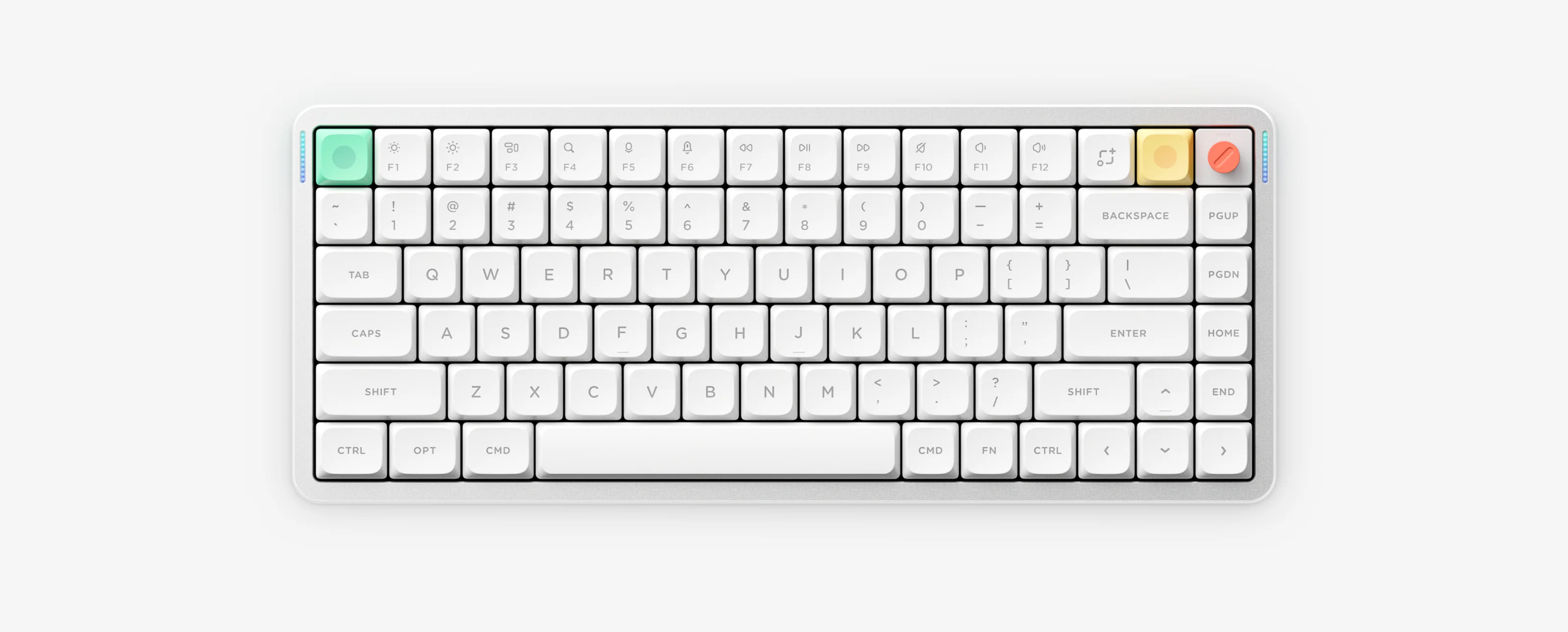
Air75 V3 upgrades the 75% low-profile lineup with Low-Profile 3.0 Nano switches, gasket mount, a replaceable rotary knob, 4000mAh battery, and NuPhyIO 2.0 configuration across ANSI, ISO and JIS layouts.
Air75 V3 10-Second Cheat Sheet
- Configuration tool
- NuPhyIO 2.0 (WebHID in Chrome/Edge, USB-C wired)
- Wireless channels
- FN + 1 / 2 / 3 (BT, hold 3s); FN + 4 (2.4G)
- Turn off lights
- FN + ↓ dim or FN + ] 6-min auto-sleep
- Battery & indicator
- 4000mAh (FN + \ ANSI): Green 96–100%, Orange 11–95%, Red 1–10%
- ANSI factory reset
- FN + [ hold 3s (ISO/JIS reset keys vary — check manual)
- Rotary knob
- Replaceable module; rotates, presses, remappable in NuPhyIO
Verified Air75 V3 Shortcuts (ANSI Reference)
- FN + 1 / 2 / 3 Bluetooth channels 1–3 Short press switches device; hold 3 seconds until fast blue flash to pair
- FN + 4 2.4G wireless mode (1000Hz) Press FN + 4 before connecting the receiver away from USB 3.0/metal hubs
- FN + ↑ / ↓ / ← / → Backlight brightness, effect and color (20 north-facing modes)
- FN + < / > Decrease or increase backlight speed
- FN + M + ↑ / ↓ / ← / → / < / > Sidelight brightness, effect, color and speed
- FN + ] Toggle 6-minute auto-sleep mode 3x Green = Sleep ON, 3x Red = Sleep OFF
- FN + \ Toggle persistent battery LED display (ANSI)
- FN + [ Hold 3 seconds to factory reset (ANSI) ISO and JIS units use layout-specific reset keys in the NuPhyIO center
- Rotary Knob Volume / mute or custom action programmed in NuPhyIO
75% ANSI keyboard diagram for Air75 V2, Air75 V3 and Air96 V2 (sections 01–09)
ANSI / ISO / JIS Layout & Battery Charging Notes
- The local PDF quick guide covers the 84-key ANSI layout; ISO and JIS Air75 V3 owners must open the NuPhyIO official manual center because reset and sleep keys differ by physical layout.
- Battery runtime of 60–100 hours (all lights on) and up to 1200 hours (RGB off) is based on NuPhy laboratory data.
- Charge Air75 V3 using a standard 5V/1A charger or computer USB port; avoid high-power fast chargers.
Air75 V3 Specifications
Layout
ANSI version: 75%, 84 keys. JIS and ISO users need the matching manual.
Switches
Low-profile 3.0 Nano switches with 3.5 mm travel.
Keyboard features
Gasket mount, hot-swap, N-key rollover and north-facing RGB with 20 modes.
Connectivity
2.4GHz, USB-C wired and Bluetooth 5.0.
Polling rate
Wired and 2.4GHz: 1000Hz; Bluetooth: 125Hz.
Materials
Aluminum top, ABS bottom, PC plate and double-shot PBT keycaps.
Size and weight
318.9 × 128.9 × 13.2 mm; 724 g; 4° / 8° / 10° typing angles.
Compatibility
macOS, Windows, Android and iOS only.
Battery
4000mAh. Based on laboratory data: 60–100 hours with all lights on, and up to 1200 hours with RGB off.
Knob
The replaceable knob rotates, presses and is configurable in NuPhyIO.
Air75 V3 Manuals & NuPhyIO Resources
Air75 V3 Frequently Asked Questions
What is the real Air75 V3 battery life and how should I charge it?
Based on NuPhy laboratory data, the 4000mAh battery lasts 60 to 100 hours with all lights on and up to 1200 hours with RGB off. NuPhy recommends charging via a 5V/1A charger or computer USB port rather than high-power fast chargers.
Does Air75 V3 use NuPhyIO or VIA?
Air75 V3 uses NuPhyIO (NuPhyIO 2.0 web or desktop app), not VIA. Connect directly via USB-C in Wired mode using Chrome or Microsoft Edge.
Where do I find ISO or JIS shortcuts for Air75 V3?
The local PDF covers ANSI only. ISO and JIS owners should open the official NuPhyIO manual center and select their exact Air75 V3 layout because reset and sleep key combinations vary by region.
Can I customize the Air75 V3 rotary knob?
Yes. The replaceable knob rotates and clicks, and both rotation and press functions can be remapped inside NuPhyIO.