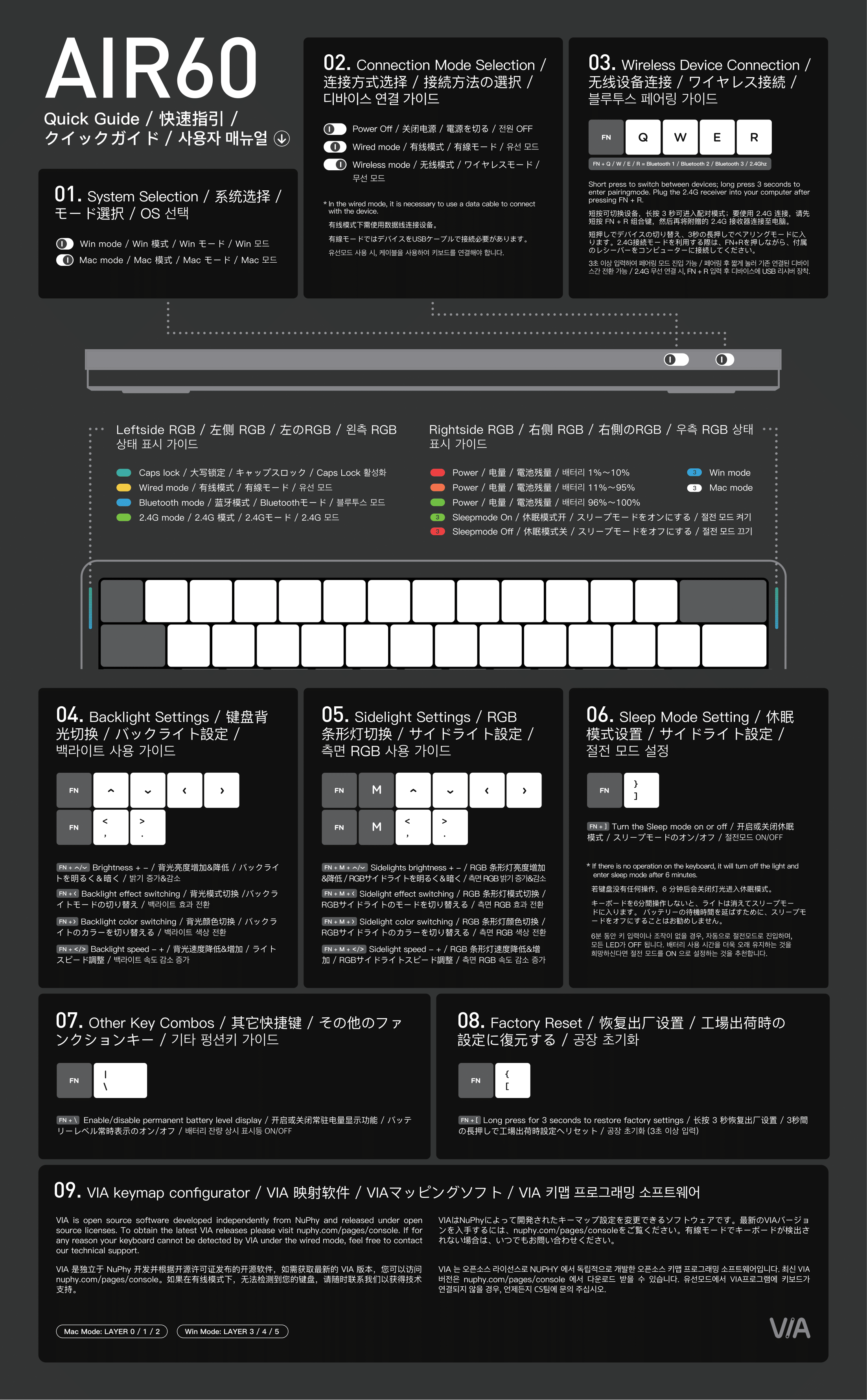
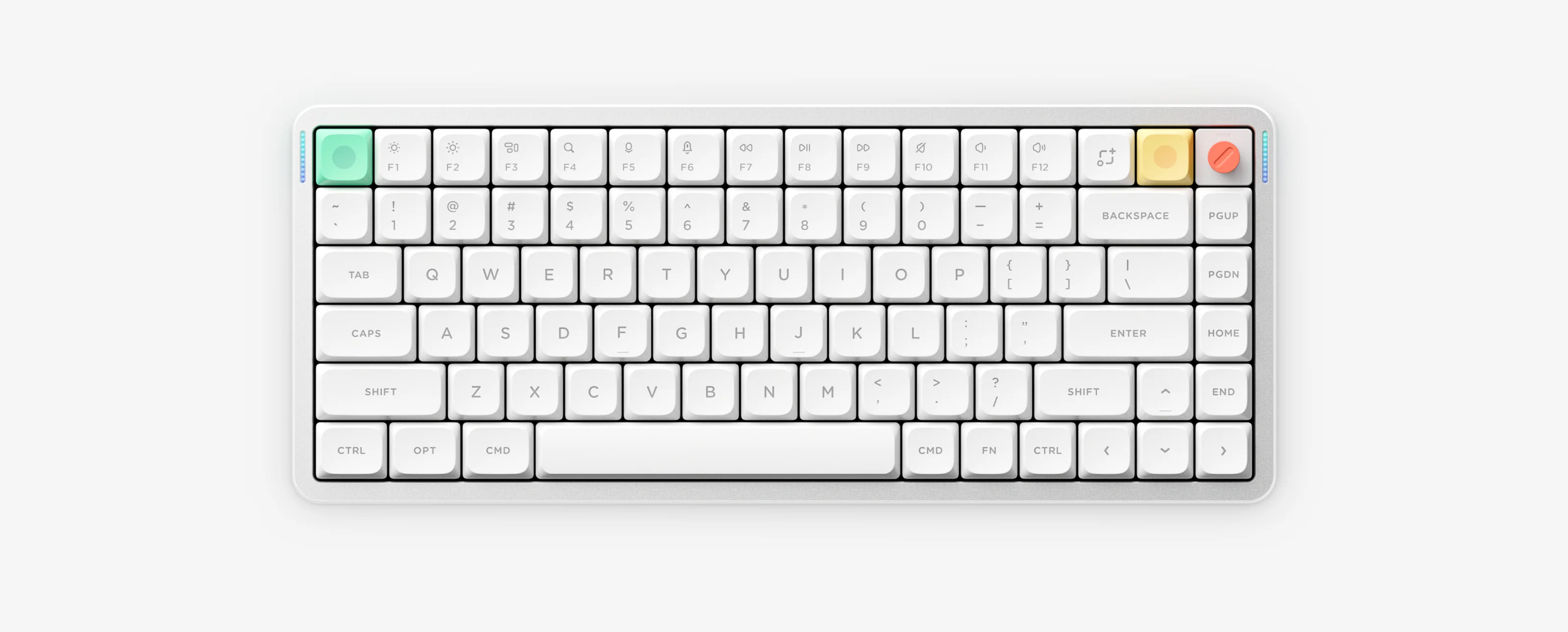
Air60 V2 is a 60% ultra-slim low-profile tri-mode keyboard (64 keys) configured with QMK/VIA. Because its compact 60% layout omits the F-row, it uses FN + Q / W / E / R for wireless channels instead of number keys.
Air60 V2 10-Second Cheat Sheet
- Configuration tool
- VIA (WebHID in Chrome/Edge, USB-C wired)
- Bluetooth 1 / 2 / 3
- FN + Q / W / E (hold 3s to pair)
- 2.4G wireless
- FN + R (hold 3s to re-pair)
- Turn off lights
- FN + ↓ to dim or FN + ] for 6-min auto-sleep
- Battery & reset
- FN + \ battery bar (96–100% / 11–95% / 1–10%); FN + [ (3s) reset
Verified Air60 V2 Shortcuts
- FN + Q / W / E Switch Bluetooth channels 1, 2 or 3 Hold 3 seconds until left blue LED flashes fast to pair
- FN + R Switch to 2.4G receiver mode Hold 3 seconds to re-pair; plug receiver away from USB 3.0 hubs
- FN + ↑ / ↓ Increase or decrease backlight brightness
- FN + ← / → Switch backlight effect / switch backlight color
- FN + < / > Decrease or increase backlight speed
- FN + M + ↑ / ↓ / ← / → / < / > Adjust sidelight brightness, effect, color and speed
- FN + ] Toggle 6-minute auto-sleep mode Lights turn off automatically after 6 minutes idle
- FN + \ Toggle persistent right-side battery LED display
- FN + [ Hold 3 seconds to restore factory settings
Layout, Charging & Air60 V3 Notes
- Air60 V2 uses a 64-key 60% low-profile ANSI layout and shares the Air series battery LED tier: Green 96%–100%, Orange 11%–95%, Red 1%–10%.
- Use a standard 5V/1A charger or computer USB port; avoid high-power USB-PD fast chargers.
- Searching for an Air60 V3? NuPhy has not released an Air60 V3 — 60% models are Air60 V2 (VIA) and Air60 HE (wired NuPhyIO), while released Air V3 boards are Air75 V3 and Air100 V3.
Air60 V2 Manual & VIA Resources
Air60 V2 Frequently Asked Questions
Why does Air60 V2 use FN plus Q, W, E and R instead of 1, 2, 3 and 4?
Air60 V2 has a compact 60 percent 64-key layout, so NuPhy assigns Bluetooth channels 1 to 3 to FN plus Q, W and E, and 2.4G wireless to FN plus R.
Does Air60 V2 use VIA or NuPhyIO?
Air60 V2 uses QMK and VIA through NuPhy Console or Web VIA in Chrome or Microsoft Edge while connected with a direct USB-C data cable in Wired mode. It is not a NuPhyIO keyboard.
How do I turn off Air60 V2 backlight lights?
Lower backlight brightness step by step using FN plus the Down arrow, or enable 6-minute auto-sleep with FN plus the right bracket key so lighting powers down when idle.
Is there an Air60 V3 model?
No. NuPhy’s official manual directory does not list an Air60 V3. Verified 60 percent models are Air60 V2 and Air60 HE, while released Air V3 models are Air75 V3 and Air100 V3.